Platform Service

BIO·STOR

The BIO·Stor data lake — typed file storage for biological data, underneath the Biolytica platform. Per-format ingestion for sequences, traces, images, documents, audio, and tabular datasets; an async validation and post-processing pipeline; presigned-URL delivery direct from storage; HMAC-signed webhooks at every stage. Designed to be invisible when it works and instrumented when it doesn't.

Storage Service

A typed file storage service for biological data

BIO·STOR sits underneath every Biolytica service that needs to persist a file. Sequences, chromatograms, specimen images, supporting documents, acoustic recordings, tabular occurrence datasets, and analysis result exports — each format is validated, post-processed, and indexed by an independent pipeline, then served back through presigned URLs that route directly from object storage. The portal, API, and webhook surface are all instrumented so producers and integrators can see exactly where each object is in its lifecycle.

Profile-Driven Schema

Format and purpose are separate concerns, so the schema doesn't fork for every use case

A BIO·STOR object carries two layers of metadata: a profile (what role the file plays — specimen image, lab notebook, chromatogram, acoustic survey, occurrence dataset, analysis result) and an extension (the format on disk). One file extension can serve many profiles. The portal binds domain metadata to the profile, format-physical stats to the extension, and both link to a shared object_meta row. Adding new use cases never forks the underlying schema — and a profile can run its own domain procedures, so profiles like acoustic survey or paired-end metabarcoding are parsed into dedicated profile tables during post-processing.

22 profiles 24 extensions Profile/extension routing Domain metadata
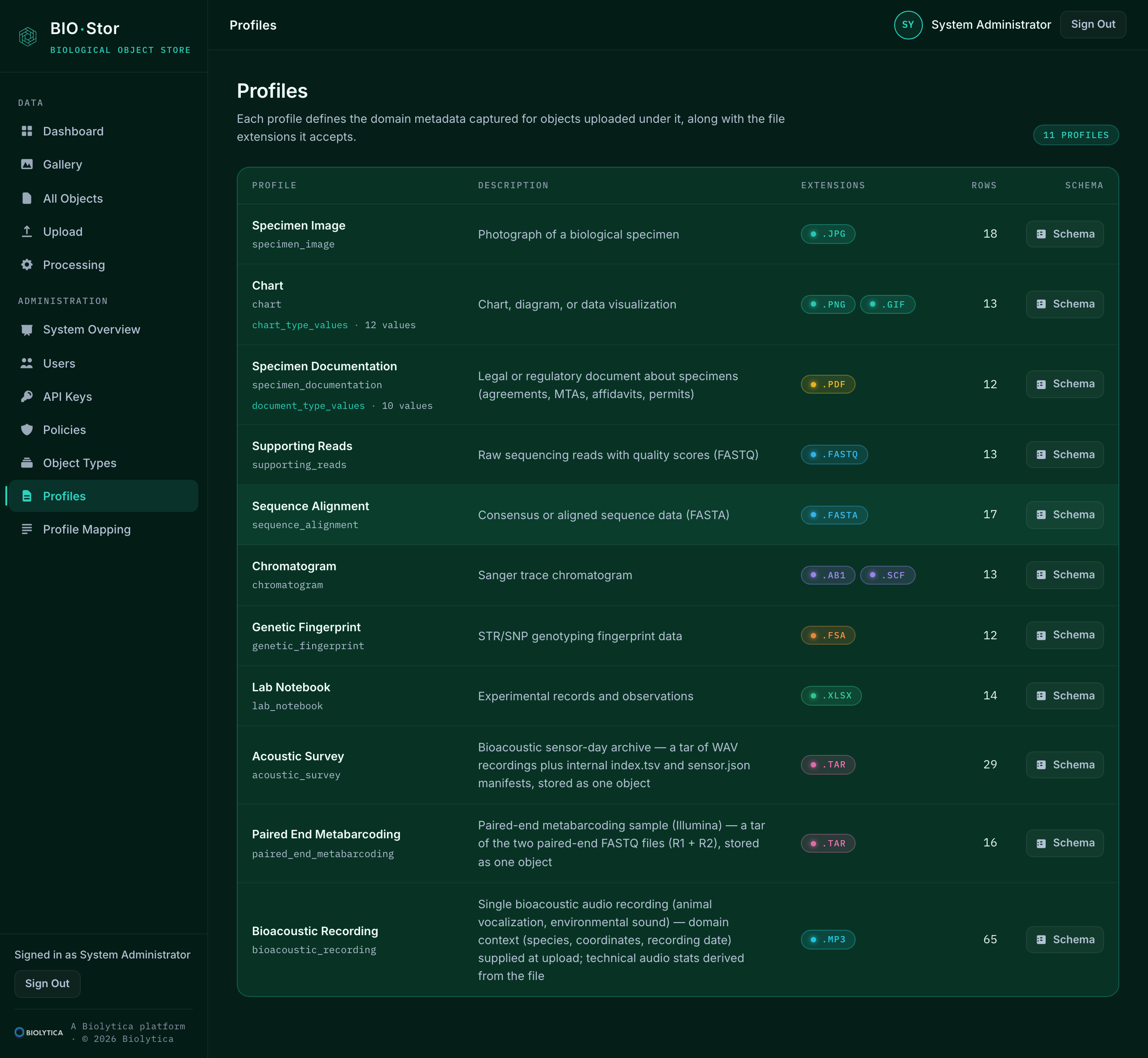
BIO·Stor admin profiles page listing the twenty-one registered profiles with their accepted extensions and row counts
The twenty-one registered profiles, each with the file extensions it accepts and a live count of objects bound to it.
Async Pipeline

Every upload moves through four observable stages, with state and timing recorded end-to-end

Upload → Validate → Postprocess → Ready. Each stage is queued through RabbitMQ and executed by an independent worker pool with its own scaling and retry behaviour. Validation parses and fingerprints the file; postprocessing derives statistics, thumbnails, rendered surrogates, and — for packaged profiles like acoustic survey — domain records parsed from the package manifest. Every state transition is recorded in object_meta with timing and any error. Webhook callbacks fire on validation-complete and postprocessing-complete — HMAC-SHA256 signed with the requesting account's secret.

Outbox-relayed Independent workers per stage HMAC webhooks Per-object timing
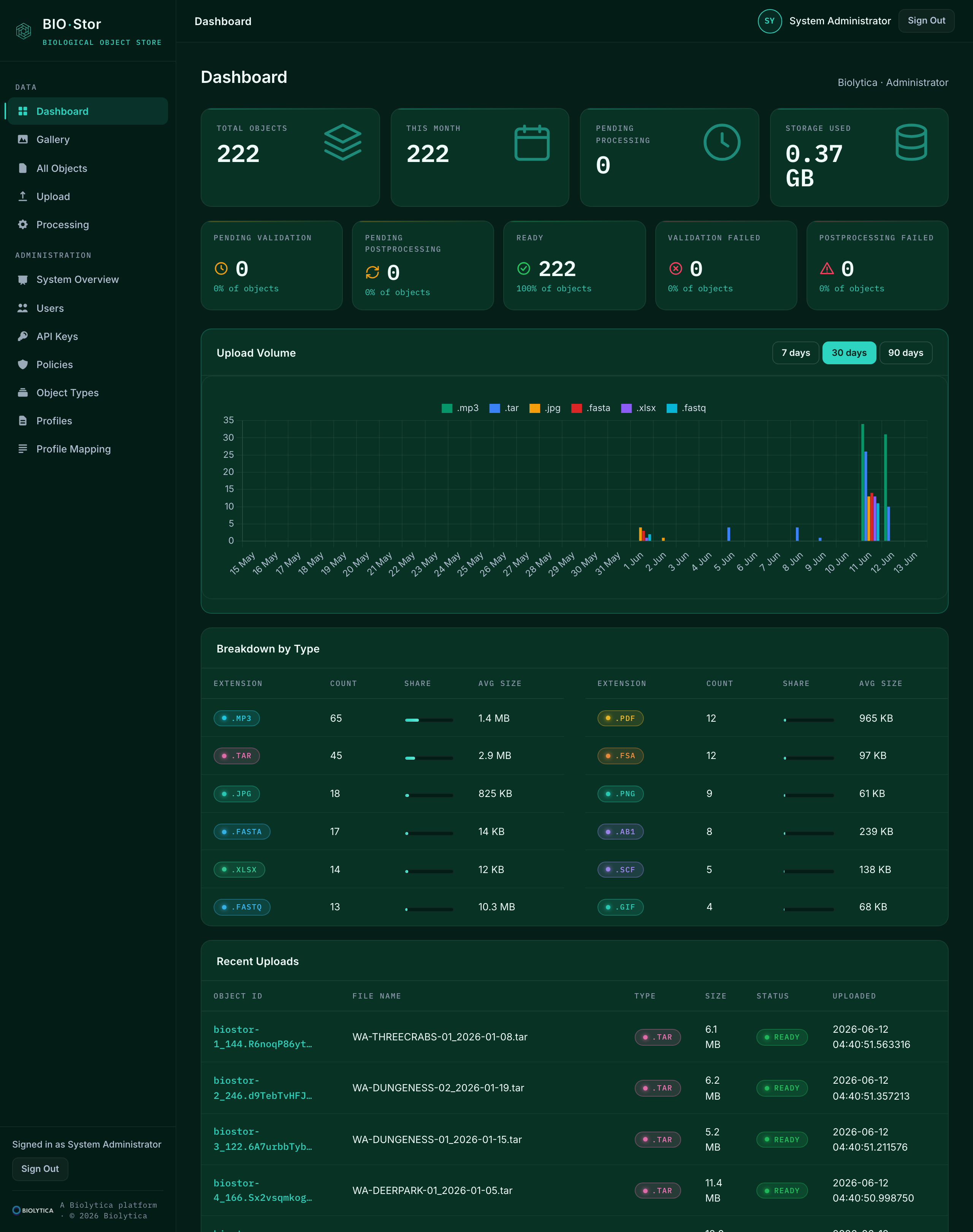
BIO·Stor dashboard showing per-state processing tiles, upload volume over time, and breakdown by file extension
The dashboard — a tile per pipeline state, upload volume by day, and breakdown by extension, all read from live object_meta.
Direct Delivery

302 redirects to presigned blob URLs, so bandwidth never crosses the API tier

A GET against an object returns a 302 to a short-lived presigned Azure Blob URL. The client streams the bytes straight from storage; the API tier never touches the payload. Rendered surrogates — thumbnails for images, first-page previews for PDFs and spreadsheets, sequence and trace graphs, spectrograms for acoustic recordings — are produced during postprocessing and delivered the same way. Every object detail view in the portal shows the full set of preview blobs alongside its system, profile, and format metadata.

Presigned URLs Three-size thumbnails Rendered surrogates Zero API egress
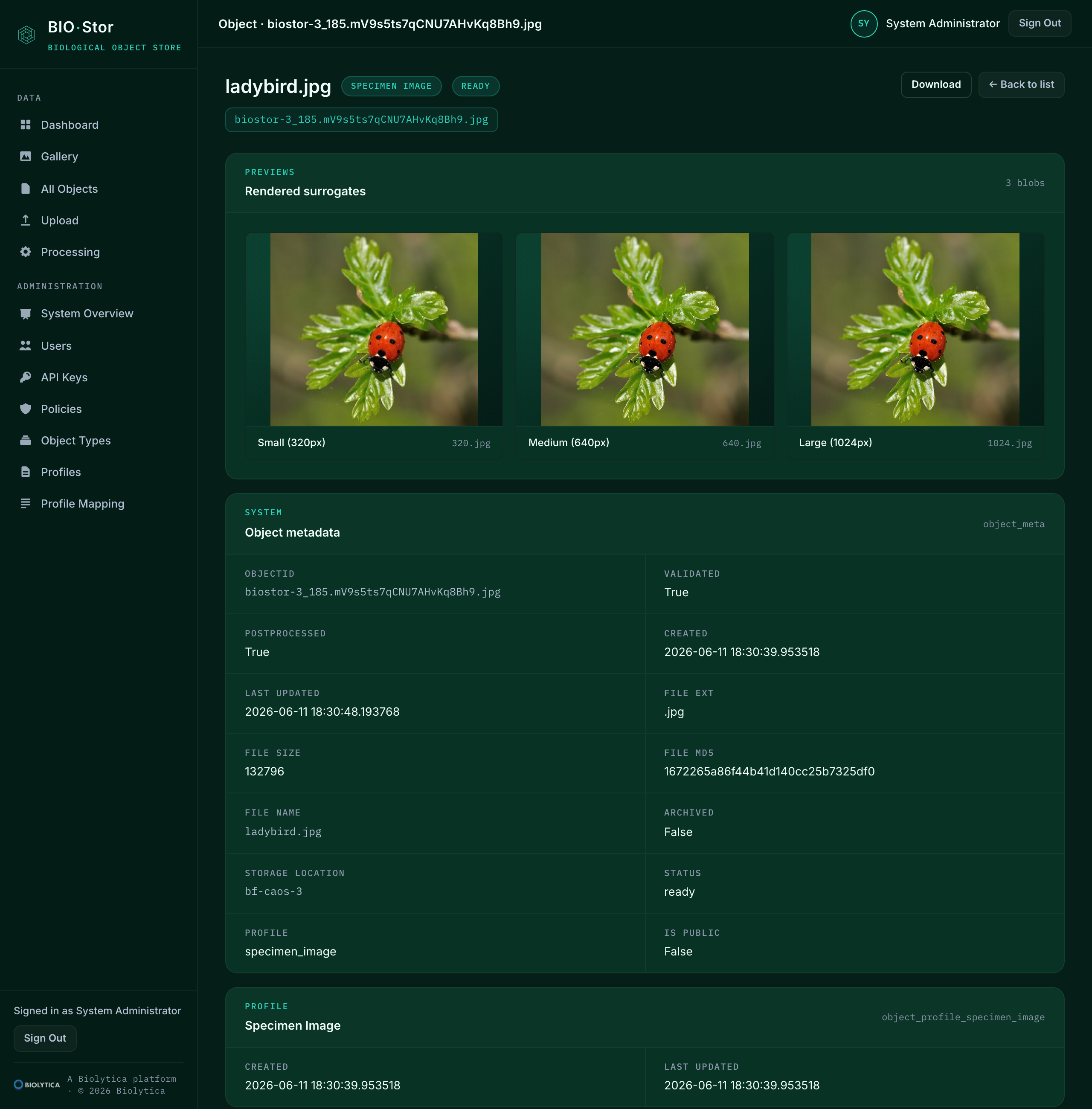
BIO·Stor object detail page showing rendered surrogate thumbnails alongside system, profile, and format metadata for a single object
An object detail page — rendered preview thumbnails, then system, profile, and format-physical metadata in three labelled sections.
Administration & Governance

Institutional scopes, per-extension size limits, processing visibility, and audit-friendly state transitions

Operators get a single admin surface for users, API keys, access policies, and per-extension size limits, plus a system overview that shows queue depths, worker status, and recent state transitions across the platform. Service accounts (BoldForensic workbench, BIO·Nexus, integration clients) authenticate via institutional API keys; webhook secrets are managed alongside. Failure modes — pending validation, pending postprocessing, validation failed, postprocessing failed — are surfaced as their own queues, ready to triage.

Institutional API keys Per-extension size limits Queue visibility Failure triage State-transition log
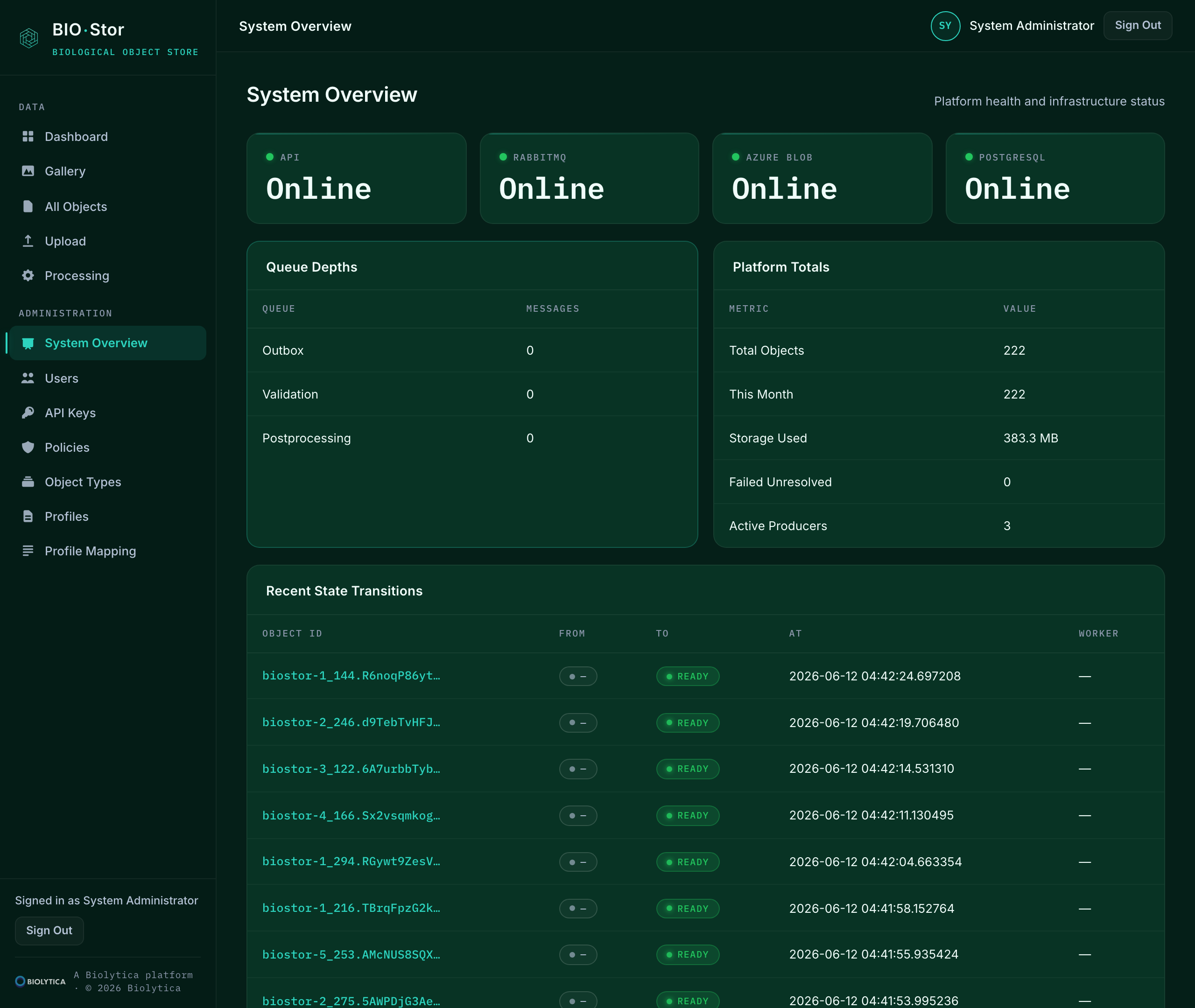
BIO·Stor system overview page showing live health of API, RabbitMQ, Azure Blob, and Postgres alongside queue depths, platform totals, and recent state transitions
The system overview — live status across the four infrastructure dependencies, queue depths, and the most recent state transitions across the platform.
Platform Integration

Built to disappear behind the workbench

BIO·STOR is the file plane underneath the BoldForensic workbench, BIO·NEXUS, and any other service in the Biolytica stack that needs a typed data lake. Producers upload through the portal or the API; consuming services retrieve by object id and follow the 302 to presigned storage. The system is designed so that no one outside of operations needs to think about it — objects just appear, validate, and become retrievable.

Producers don't have to choose a format up front. The portal's upload page exposes a profile picker that adapts its metadata form to whichever profile is selected — specimen image, chart, chromatogram, sequence alignment, and so on — and the resulting object inherits the right metadata table behind the scenes. Batch uploads ship a metadata.csv manifest with the package; one-off uploads use the form inline.

For institutional service accounts, the surface is the same API the portal calls. Per-stage webhook callbacks let an integrating service know when each object is ready without polling, and webhook payloads carry an HMAC-SHA256 signature derived from the account's secret.

Workbench Plane Portal Upload Per-Stage Webhooks HMAC Signing Service Accounts
Browse the API surface
PUT /api/objects

curl -X PUT https://biostor/api/objects \ -H "api-key: $BIOSTOR_KEY" \ -F "object_file=@specimen_42.jpg" # → { "object_id": "biostor-3_172.….jpg" }

PUT /api/batch

curl -X PUT https://biostor/api/batch \ -H "api-key: $BIOSTOR_KEY" \ -F "[email protected]" # → { "count": 14, "object_ids": […] }

GET /api/objects/<id>

curl -L https://biostor/api/objects/$ID \ -H "api-key: $BIOSTOR_KEY" \ -o specimen_42.jpg # → 302 to presigned Azure Blob URL

What's Included

BIO·STOR running against your institution's storage. Typed ingestion across 24 file extensions — images, sequences, traces, documents, spreadsheets, audio, archives, and tabular data (Parquet, JSONL, TSV). Validation and post-processing workers sized to your throughput, presigned-URL delivery, HMAC-signed webhooks, an admin surface for users and keys, a portal for producers, and per-extension policies. Audit-friendly state transitions on every object, monitored queues, and a triage view for processing failures.

Audiences

Who uses BIO·STOR?

A platform service used by producers, consuming services, and operators — each with a surface shaped to their job.

01

Producers & Curators

Upload specimens, sequences, traces, documentation, acoustic recordings, and tabular datasets through the portal. Inspect rendered previews and data previews, browse the gallery, pick a profile per object, and re-process failures from a single triage view.

02

Consuming Services

The BoldForensic workbench, BIO·NEXUS, and other Biolytica services authenticate with institutional API keys, submit through the upload endpoints, retrieve through 302 redirects, and listen for HMAC-signed callbacks.

03

Administrators

Manage users, API keys, policies, and per-extension size limits. Monitor queue depths, recent state transitions, and the processing failure board. Read the live system overview at a glance.

New to the platform? Reach out for an institutional account, or sign in directly if your account is already provisioned.

Sign in to portal